Tuesday, July 24, 2018

Oracle Database Installation 18c, On-Premise

Oracle Database Installation 18c, On-Premise


Finally wait is over. Oracle has launched Oracle Database 18c, On-Premise.

Oracle has simplified database Installation task. It is now easy to install binaries in few steps and ready to create database.

The beauty of this release; It's simple, Unzip the download, Re-link binaries and Ready to Go...

You have three options to install database; Starting with Oracle Database 18c release.
1) Image-based Oracle Database Installation
2) RPM-Based Oracle Database Installation
3) Read-Only Oracle Home

According to me, these are very much simplest method to install database till now,
Let's understand how these different options help us,

1) Image-based Oracle Database Installation (new in Oracle 18c, on-premise)
Image-based Installation enables you to download zip file and extract the image software into your Oracle Home directory and run Installer script to start database installation.
Unzip the download and Re-link binaries...that's it.

2) RPM-Based Oracle Database Installation
Here, using RPM-based Database Installation (RDI), use rpm -ivh command to install database installation, which performs pre-validations, extract packages assigns ownership, oracle inventory, users and groups, and executes all other scripts and root operations to complete database software installation.

3) Read-Only Oracle Home (new in Oracle 18c, on-premise)
In this option, you are privileged to make your Oracle Home in read-only mode. Database tools and processes writes under ORACLE_BASE path rather ORACLE_HOME directory.
This helps to do version control and patching oracle home. Oracle has include built-in tool, called "rhpctl", that enables you to switch from the current Oracle Database home to a patched Oracle Database home.

Check out Database Installation steps here,
I am using Image-based Oracle Database Installation

Download Oracle Dabase 18c from this link.
https://www.oracle.com/technetwork/database/enterprise-edition/downloads/index.html

Unzip the installer.
$ unzip -d LINUX.X64_180000_db_home.zip /u01/DB18c


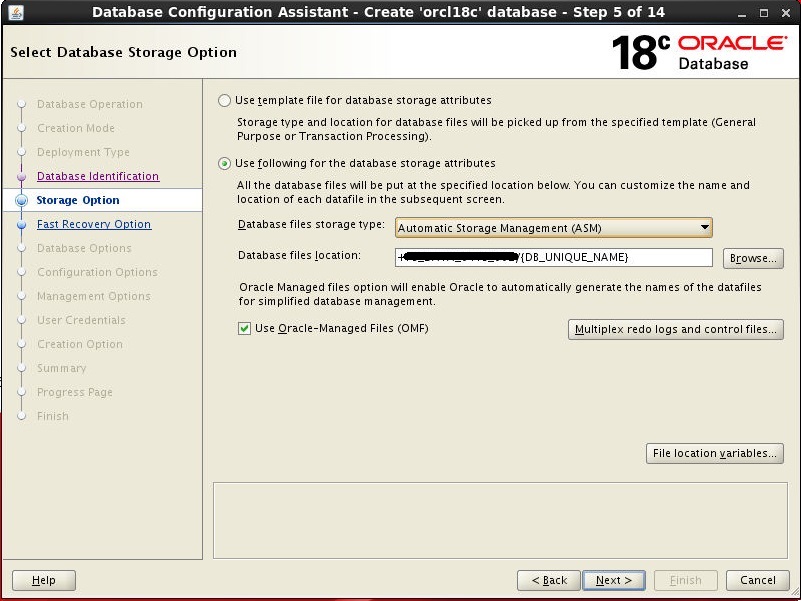
Till this point your database binaries are installed. Now you can use dbca to configure database.
Below screenshots helps you to create and configure single instance database.


Here, we are done. Our database is installed and ready to use.


Thanks & Regards,
Chandan Tanwani
Oracle Performance Tuning Certified Expert

Monday, June 11, 2018

Truncate cascade : New feature of 12c

Truncate cascade : New feature of 12c


There is new feature in Oracle 12c, “Truncate cascade”. 12c onwards cascade option is available with truncate command.
It means that if you are truncating parent table’s data, corresponding records in child table also truncated.

Let’s have small demo, how it’s works,

create table order_mst
(ord_id number primary key,
ord_date date,
cust_name varchar2(500)
);

create table order_dtl
(ordtl_id number primary key,
ord_id number REFERENCES order_mst (ord_id) on delete cascade,
itm_name varchar2(500),
itm_price number
);


NOTE: Hope, you have notice on delete cascade option added with foreign key. This one is the key point. If you are not mentioning it during table creation, you cannot use the cascade option with truncate command.

Let's few demo rows in both parent and child tables as below,


insert into order_mst values (1,sysdate, 'Scott');
insert into order_dtl values (1,1,'Bread',20);
insert into order_dtl values (2,1,'Butter',50);
insert into order_dtl values (3,1,'Biscutes',15);

insert into order_mst values (2,sysdate, 'Tiger');
insert into order_dtl values (4,2,'Cream',20);
insert into order_dtl values (5,2,'Roll',50);
insert into order_dtl values (6,2,'Biscutes',15);

commit;


As we have inserted above sample data, let's check the same.


At this point we are good. Data is reflecting and having parent-child relationship too.
Now, what if i truncate order_mst table?

SQL> truncate table order_mst;
truncate table order_mst
               *
ERROR at line 1:
ORA-02266: unique/primary keys in table referenced by enabled foreign keys


So, it is not allowing to truncate data as child table is having some reference data in it.
Now, let's try cascade option with the same command.

SQL> truncate table order_mst cascade;
Table truncated.

SQL> select * from order_mst;
no rows selected

SQL> select * from order_dtl;
no rows selected

Oh, Waaw, cascade truncated order master and detail both the tables.


Hope this small demo will help you to understand truncate cascade option.


Thanks & Regards,
Chandan Tanwani
Oracle Performance Tuning Certified Expert

Wednesday, May 23, 2018

Oracle Real World Performance Tour India 2018, Pune

Oracle Real World Performance Tour India 2018, Pune


AIOUG has organized tremendous event of Oracle Real World Performance in India, with Oracle Gurus Andrew Holdsworth (Oracle USA), Toon Koppelaars (Oracle Netherlands) and Christine Qu (Oracle China).

The Real-World Performance (RWP) Group is part of the Oracle Database Development organization. Engineers in the RWP group focus on extracting the maximum performance from the Oracle Database and hardware in the real-world.

The event had been planned in the month of May-2018 and AIOUG hosted in three cities,
03-May-2018 – Hyderabad
05-May-2018 – Pune
06-May-2018 - Bengaluru


Memories of RWP - Pune event.


Christine Qu, Andrew Holdsworth and Toon Koppelaars  
Vinay in action, Welcoming RWP Team and AIOUG Intro
Me, Thanking to RWP team and all Participants in closing session
 
Group Photo with All Participants


Mumbai and Pune Volunteers with RWP Team


Mumbai and Pune Chapter Volunteers, who worked very hard and made a very Successful  Event


Thanks & Regards,
Chandan Tanwani
Oracle Performance Tuning Certified Expert
 

Thursday, April 12, 2018

Buffer Exterminate wait event.

Buffer Exterminate wait event.


Recently someone ask a question, What is Buffer Exterminate wait event? When and How it occur ? and How to find root cause of the same.


Let's first understand What exactly Buffer Exterminate wait event.

As we are aware that ASMM and AMM is enabled in our database SGA memory component will resize dynamically as and when needed.
Now when your buffer cache was shrunk and one of your session want to access to a data block that resides in a buffer cache within that granule which is marked to be freed. At this moment session cannot search data block and needs to reload the data block in available granule's of buffer cache. This is called buffer exterminate and session waiting for such exterminate buffer comes under this event.


When and How it occure ?
This wait occurs when buffer cache shrinked and some session want to access that data block.


How to find root cause of the same?


As dynamic resizing happens, it is difficult to reproduce this issue. But when you see this wait event in AWR report or related ORA-600 in alert log file, you should consider to tune your buffer cache.

Below are some views, you can use to identify current size of SGA components and what changes occurs with memory components.

V$SGA_DYNAMIC_COMPONENTS displays information about the dynamic SGA components. This view summarizes information based on all completed SGA resize operations since instance startup.

V$SGA_CURRENT_RESIZE_OPS displays information about SGA resize operations which are currently in progress. An operation can be a grow or a shrink of a dynamic SGA component.

V$SGA_DYNAMIC_FREE_MEMORY displays information about the amount of SGA memory available for future dynamic SGA resize operations.

V$MEMORY_RESIZE_OPS displays information about the last 800 completed memory resize operations (both automatic and manual). This does not include in-progress operations. All sizes are expressed in bytes

I hope this article will help you to understand the behaviour of buffer cache and wait happnes due to dynamic sizing of buffer cache.


Thanks & Regards,
Chandan Tanwani
Oracle Performance Tuning Certified Expert


Monday, March 26, 2018

Oracle Force Full Database Cache Mode

Oracle Force Full Database Cache Mode


One of the most expensive operations in Oracle Database is to read data from disk. Most of our performance tuning goal is to reduce IO and read block from memory.

Oracle’s db_buffer_cache is smart enough to decide what to cache and when to edge out the data blocks when not frequently used or no room for new data. Sometime edging out of data become very frequently and we face performance degradation and very high IO read from disk.

Beginning with 12cR1 (12.1.0.2) Oracle introduces a new Feature called FORCE FULL DATABASE CACHING. This Feature allows DBA to cache complete database in db buffer cache.

Starting with Oracle Database 12c Release 1 (12.1.0.2), there are two Database Caching Modes:

  • Default Database Caching Mode.
  • Force Full Database Caching Mode.
Default Database Caching Mode
If Database instance determines that there is enough space to cache the Full Database in the buffer cache and that it would be beneficial to gain performance, and then the instance automatically caches the Full Database in the buffer cache. This is a new feature in 12.1.0.2.

If the Oracle Database instance determines that there is not enough space to cache the Full Database in the buffer cache, then:

From Oracle Docs, Doc ID 1941494.1
Smaller tables are loaded into memory only when the table size is less than 2 percent of the buffer cache size.

For medium tables, Oracle Database analyzes the interval between the last table scan and the aging timestamp of the buffer cache.
If the size of the table reused in the last table scan is greater than the remaining buffer cache size, then the table is cached.

Large tables are typically not loaded into memory, unless if you explicitly declare the table for the KEEP buffer pool.

Force Full Database Caching Mode

In force Full Database Caching Mode, Oracle Database caches the entire database in memory when the size of the database is smaller than the database buffer cache size.
All data files, including NOCACHE LOBs, will be loaded into the buffer cache. This feature can improve database performance drastically for the queries which performing full table scans and IO intensive queries.

In a multitenant environment, force Full Database Caching Mode applies to the entire multitenant container database (CDB), including all of its pluggable databases (PDBs).

Must note below things before activating Force Full DB Cache Mode

  • The database size must be smaller than the BUFFER CACHE size. It is recommended that SGA should be 20% more than DB Size
  • The TEMP and the SYSAUX Tablespace can be excluded.
  • NOCACHE Securefile will be also CACHED
  • In a multitenant configuration this feature works at CDB level and all PDBs are considered for Caching Data

FAQs of Force Full DB Cache Mode

Q. What type of performance benefit we get from Force full database caching mode?
Ans. Performance benefit can be seen on IO bound and higher read intensive databases and queries which are doing full table scan.

Q. What if buffer cache is not sufficient to hold my database in cache?
Ans. If this is the case Force Full Caching setting automatically be turned off. This can be seen in alert log file.

Q. In a Multitenant environment, Is Force Full Database Caching applies to All PDBs?
Ans. Yes, It applies to entire multitenant Container Database (CDB) including all of its pluggable database (PDBs).

Q. How objects are going to be loaded/cached in Buffers?
Ans. Objects will be cached when they are accessed. Objects were not cached or loaded in buffer immediately after instance started.

Q. Where can i find information about Force Full Database Caching Mode.
Ans. You can find information in control file.

Q. What if my control file is replaced or lost?
Ans. If the control file is replace or recreated then the information about the force full database caching mode is lost. Restored control file might have information depending on when the control file was backed up.

Q. How to estimate the buffer cache size for Force Full DB Cache Mode when the instance is under normal workload:
Ans. Use below query,
SELECT NAME, BYTES FROM V$SGAINFO WHERE NAME = 'Buffer Cache Size';

Q. How to check if database is in Force Full DB Cache Mode?
Ans. Use below query to check. if FORCE_FULL_DB_CACHING showing yes than DB is in Force Full Caching Mode
SELECT FORCE_FULL_DB_CACHING FROM V$DATABASE;

Q. Is it recommended for OLTP Database?
Ans. No, my recommendation is for data warehouse workloads. This is because we cannot calculate OLTP database size due to frequent data grows. Hence if it crosses to your allocated buffer cache size than force full caching mode converts in default caching mode and you will not get benefit of this.

How to enable Force Full DB Cache Mode

Only Three Steps to enable force full db cache mode.

1) Start database should be in mount state
Sql> Startup mount

2) Alter database with force full caching
Sql> alter database force full database caching;

3) Now Open database normally
Sql> alter database open;

How to Disable Force Full DB Cache Mode

Only Three Steps to disable force full db cache mode.

1) Start database should be in mount state
Sql> Startup mount

2) Alter database with force full caching
Sql> alter database NO force full database caching;

3) Now Open database normally
Sql> alter database open;


I am very glad to share information on Oracle Force Full Database Cache Mode. Recently I have presented session Oracle Force Full Database Cache Mode in @AIOUG Gujarat Chapter and @AIOUG Mumbai Chapter.

Please find attachment of my Presentation for the same.
My presentation is more sort of on FAQ to understand Force Full Database Cache Mode.


Thanks & Regards,
Chandan Tanwani
Oracle Performance Tuning Certified Expert